How to get series marked as completed?

Maydaypilot

Experienced
Joined
Sep 7, 2019
Posts
55
I recently published Her Best Friends’ Son Pt. 06. As I mention in the author’s note and “special instructions to moderator” space in the submission form, it is the end of the series.

But if you open my profile it is not marked as complete. Any advice on how to get that changed?

Thanks,
MP
 
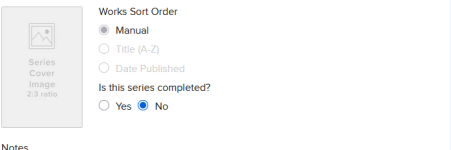
Do I have to switch my series to manual to mark it as complete?

Of the five or so series created automatically only one has been identified as complete. I don't see the "Is this series completed?" text/button that @YmaOHyd mentions.
 
Do I have to switch my series to manual to mark it as complete?

Of the five or so series created automatically only one has been identified as complete. I don't see the "Is this series completed?" text/button that @YmaOHyd mentions.
Can you post a screenshot of the dashboard for the series?

1770566291070.png
 
Can you post a screenshot of the dashboard for the series?

View attachment 2595065
I sort of answered my own question. Once I switched it to manual I saw the screen that you've shown. Thank you!

My larger question remains. One of my automatically managed series got correctly marked as complete but the rest show as in progress. So far it looks like I'll have to switch each series to manual to be able to mark it complete, or is there some trick, like writing "the end" at the end of the last chapter that will also work?
 
I have only ever used manual series, so I cannot answer your question definitively.

That said, are you able to switch them to manual and then close the series?
 
I have only ever used manual series, so I cannot answer your question definitively.

That said, are you able to switch them to manual and then close the series?
Yes. Once I switched to manual I saw the option to mark as complete, although I can't change the sort order.

I've just been reluctant to do so since I otherwise don't mind the automatic management of the series, but it's not a big deal either way so I guess I'll start switching over.
 
Back
Top