Shymidwestgirl
Impish Pixie
- Joined
- Feb 22, 2016
- Posts
- 9,023
It’s too big and if I keep cropping it there will be nothing left to show.I'm so glad they turned out!!!
What issue are you running into with adding a photo?
Follow along with the video below to see how to install our site as a web app on your home screen.
Note: This feature may not be available in some browsers.
It’s too big and if I keep cropping it there will be nothing left to show.I'm so glad they turned out!!!
What issue are you running into with adding a photo?
Always make at least two... I never have time to make one when I get home and sometimes you just gotta have lasagneThe last time I made lasagna, I made two and froze one... I looked at it in the freezer today thinking I'd re-bake it for dinner!

@ShymidwestgirlIt’s too big and if I keep cropping it there will be nothing left to show.

That's a solid name. 12 miles done for the day. Just polished off an aleppo pepper and asiago cheese scrolls from the local bakery.Tristan. He was a good boy.

Yeah the image size restriction on this site is dismal.It’s too big and if I keep cropping it there will be nothing left to show.

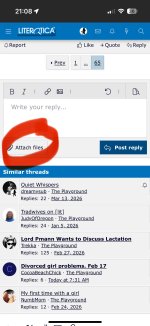


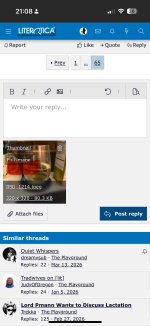

Your puppy is adorable@Shymidwestgirl @MidwestPrincess23 just in case you’ve missed a step, here’s a step by step guide to how I post pictures:
1. Click on Attach Files
View attachment 2607304
2. Click on Photo Library
View attachment 2607305
3. Click on the photo or photos you want to attach then click the sliders at the bottom right.
View attachment 2607306
4. Click on Small then Done at the top right
View attachment 2607307
5. Click on Insert
View attachment 2607308
6. Click on Full Image (or thumbnail if you want just a very small version of the photo)
View attachment 2607309
 and so photogenic
Only problem I see is the lack of nudes in your photo library in the example@Shymidwestgirl @MidwestPrincess23 just in case you’ve missed a step, here’s a step by step guide to how I post pictures:
1. Click on Attach Files
View attachment 2607304
2. Click on Photo Library
View attachment 2607305
3. Click on the photo or photos you want to attach then click the sliders at the bottom right.
View attachment 2607306
4. Click on Small then Done at the top right
View attachment 2607307
5. Click on Insert
View attachment 2607308
6. Click on Full Image (or thumbnail if you want just a very small version of the photo)
View attachment 2607309


I often just copy paste too once I've run it through compress@Shymidwestgirl @MidwestPrincess23 just in case you’ve missed a step, here’s a step by step guide to how I post pictures:
1. Click on Attach Files
2. Click on Photo Library
3. Click on the photo or photos you want to attach then click the sliders at the bottom right.
4. Click on Small then Done at the top right
5. Click on Insert
6. Click on Full Image (or thumbnail if you want just a very small version of the photo)

Looks delicious! And looks like it workedOMG you’re an absolute legend (if this works)!
Thank you and I need to try another to see if it was a fluke or I have figured it out!!Looks delicious! And looks like it worked
Patiently waitingThank you and I need to try another to see if it was a fluke or I have figured it out!!
Those look amazing!OMG you’re an absolute legend (if this works)!

It was fascinating watching this process happen!OMG you’re an absolute legend (if this works)!
Learn something new everydayIt was fascinating watching this process happen!
Oh you can say that again!Learn something new everyday
I mean if you insist…Oh you can say that again!
Such a literalist!I mean if you insist…
Learn something new everyday!

OMG you’re an absolute legend (if this works)!
What the absolute fuck?!@cheekygirl75 again the GOAT!

 )
)
There is room for two GOATs and umm three @MidwestPrincess23 for sharing the recipe.What the absolute fuck?!
Scuse me. Read my title please
(Good job
You take that ba-ah-ah-ah-ack! She's a nice lady!@cheekygirl75 again the GOAT!