Navigation
Install the app
How to install the app on iOS
Follow along with the video below to see how to install our site as a web app on your home screen.
Note: This feature may not be available in some browsers.
More options
You are using an out of date browser. It may not display this or other websites correctly.
You should upgrade or use an alternative browser.
You should upgrade or use an alternative browser.
Word counts displayed!
- Thread starter THBGato
- Start date


RejectReality
Errant Smut Slinger
- Joined
- Jan 1, 2009
- Posts
- 5,557
Where is it now displaying that it wasn't? The only place I see wordcount is on the actual story page, and that's been there for a while. I see nothing on the public works page or on anything saved to a list. Tried a shift+refresh to make sure I had the latest version, and checked all three pen names in case it was a slow rollout, but I see nothing new.

OddLove
Aimless Wanderer
- Joined
- Jun 2, 2021
- Posts
- 671
Where is it now displaying that it wasn't? The only place I see wordcount is on the actual story page, and that's been there for a while. I see nothing on the public works page or on anything saved to a list. Tried a shift+refresh to make sure I had the latest version, and checked all three pen names in case it was a slow rollout, but I see nothing new.
Oh, actually, I'm not seeing it either.

Bamagan
Ultima Proxima
- Joined
- Jul 3, 2023
- Posts
- 4,954
It's on the expanded title cards. If you scroll down on the hub pages to the ones in the 'popular' and 'random' sections you should see them below the tags. You probably have to have the beta features enabled, too.Where is it now displaying that it wasn't? The only place I see wordcount is on the actual story page, and that's been there for a while. I see nothing on the public works page or on anything saved to a list. Tried a shift+refresh to make sure I had the latest version, and checked all three pen names in case it was a slow rollout, but I see nothing new.

ClintonBrooks
Enjoy Life!
- Joined
- Sep 20, 2024
- Posts
- 2,834


anthrodisiac
Dorkaeopteryx
- Joined
- Oct 12, 2025
- Posts
- 5,418
I see nothing! I am doomed to an eternity of lack of tags and word count. Or until they show up. Whichever comes first.
And yes, I am signed up for beta features.
And yes, I am signed up for beta features.

anthrodisiac
Dorkaeopteryx
- Joined
- Oct 12, 2025
- Posts
- 5,418
Probably a rolling update. They might show up at some point 

TheLobster
Comma Aficionado
- Joined
- Jul 26, 2020
- Posts
- 5,523
The top lists are one of the oldest parts of Literotica, they ain’t getting updated with anything unless they’re just replaced wholesale. If new features are added, it will be to the profile pages which are comparatively newer.Same. I went to popular, selected BDSM, this is all I see. no tags, no word count.
But no, I’m not seeing any word counts either.
Bamagan
Ultima Proxima
- Joined
- Jul 3, 2023
- Posts
- 4,954
They only show up on the 'Modern' UI style, not the 'Classic' one.
Go to the normal category hub for any category. Under the 'New' section there are segments for 'Popular' and 'Random' which seem to be updated. They're also on the author pages.
All of that assumes the user has enabled the expanded title cards. That's an extra step beyond opting into beta features.
Go to the normal category hub for any category. Under the 'New' section there are segments for 'Popular' and 'Random' which seem to be updated. They're also on the author pages.
All of that assumes the user has enabled the expanded title cards. That's an extra step beyond opting into beta features.

TheLobster
Comma Aficionado
- Joined
- Jul 26, 2020
- Posts
- 5,523
And how do you do that? I see only the general beta opt-in on the options page and nothing about specific features like title cards.All of that assumes the user has enabled the expanded title cards. That's an extra step beyond opting into beta features.
Bamagan
Ultima Proxima
- Joined
- Jul 3, 2023
- Posts
- 4,954
To enable the expanded story cards:
Go to any Story Games* page. In the 'Story Game Info' box in the upperleft right**, where the info/tags/sharing/font controls are, select the font controls. One of the menus is 'story card format' and that needs to be set to 'expanded' in order to view the new features.
Almost as easy as setting the clock on your stove!
*Actually, it looks like they've added that option to the font controls of any story. Back when they were asking for testers it was hidden in the defunct story games, but I guess they've decided to make them slightly less arcane now.
**Sorry, I sometimes can't tell right from left unless I'm looking at @StillStunned 'spaws totally human hands.
Go to any Story Games* page. In the 'Story Game Info' box in the upper
Almost as easy as setting the clock on your stove!
*Actually, it looks like they've added that option to the font controls of any story. Back when they were asking for testers it was hidden in the defunct story games, but I guess they've decided to make them slightly less arcane now.
**Sorry, I sometimes can't tell right from left unless I'm looking at @StillStunned 's
Last edited:
anthrodisiac
Dorkaeopteryx
- Joined
- Oct 12, 2025
- Posts
- 5,418
Well, that's a whole thing. Now if they could just get Dark Mode for the freaking forums instead of just the stories, my eyes would be grateful.To enable the expanded story cards:
Go to any Story Games page. In the 'Story Game Info' box in the upper left, where the info/tags/sharing/font controls are, select the font controls. One of the menus is 'story card format' and that needs to be set to 'expanded' in order to view the new features.
Almost as easy as setting the clock on your stove!
TheLobster
Comma Aficionado
- Joined
- Jul 26, 2020
- Posts
- 5,523
Yup, that worked.To enable the expanded story cards:
Go to any Story Games page. In the 'Story Game Info' box in the upper left, where the info/tags/sharing/font controls are, select the font controls. One of the menus is 'story card format' and that needs to be set to 'expanded' in order to view the new features.
Almost as easy as setting the clock on your stove!
*Actually, it looks like they've added that option to the font controls of any story. Back when they were asking for testers it was hidden in the defunct story games, but I guess they've decided to make them slightly less arcane now.
And I could see the word count as well, for the 2 whole minutes I had those title cards enabled because holy waste of screen real estate Batman! Whose idea was it not to make those cards expandable individually, one-by-one, like logic and basic UI sensibilities would dictate?
Wait, no, don’t answer that

anthrodisiac
Dorkaeopteryx
- Joined
- Oct 12, 2025
- Posts
- 5,418
Don't mention modern UX design, don't mention modern UX design...Yup, that worked.
And I could see the word count as well, for the 2 whole minutes I had those title cards enabled because holy waste of screen real estate Batman! Whose idea was it not to make those cards expandable individually, one-by-one, like logic and basic UI sensibilities would dictate?
Wait, no, don’t answer that

bi_cathy
Clit-baiter
- Joined
- May 26, 2011
- Posts
- 232
And now that I've done that, all I can see are the very bad tags I chose for my stories, especially in the early 2010sTo enable the expanded story cards:
Go to any Story Games page. In the 'Story Game Info' box in the upper left, where the info/tags/sharing/font controls are, select the font controls. One of the menus is 'story card format' and that needs to be set to 'expanded' in order to view the new features.
Almost as easy as setting the clock on your stove!
*Actually, it looks like they've added that option to the font controls of any story. Back when they were asking for testers it was hidden in the defunct story games, but I guess they've decided to make them slightly less arcane now.

bi_cathy
Clit-baiter
- Joined
- May 26, 2011
- Posts
- 232
We're also gonna conveniently ignore the bonkers UX decision of putting a story list formatting/display choice inside the full story formatting/display choice. Makes perfect sense.Yup, that worked.
And I could see the word count as well, for the 2 whole minutes I had those title cards enabled because holy waste of screen real estate Batman! Whose idea was it not to make those cards expandable individually, one-by-one, like logic and basic UI sensibilities would dictate?
Wait, no, don’t answer that
TheLobster
Comma Aficionado
- Joined
- Jul 26, 2020
- Posts
- 5,523
In Lit's world, that's just another day ending in -y.We're also gonna conveniently ignore the bonkers UX decision of putting a story list formatting/display choice inside the full story formatting/display choice. Makes perfect sense.
Bamagan
Ultima Proxima
- Joined
- Jul 3, 2023
- Posts
- 4,954
I expect it's still hidden there to reduce the number of complaints if or when the update breaks something. If many of the users still have no idea the feature exists, they can't whine if it has to be rolled back for repairs. Or, well, their whining will be about something else they don't like, anyway.We're also gonna conveniently ignore the bonkers UX decision of putting a story list formatting/display choice inside the full story formatting/display choice. Makes perfect sense.

OddLove
Aimless Wanderer
- Joined
- Jun 2, 2021
- Posts
- 671
Okay. I went to my Control Panel, then clicked on Options to edit my profile, then clicked on the My Options tag toward the top center, then I scrolled down to "Participate in early site feature versions beta-testing" and clicked on Yes(And saved changes), then I scrolled up and clicked on Explore, then I clicked on Story Games, then I clicked on the a random story, then I looked to my left and got confused, then I looked to my right and saw "A" symbol (Font Settings) and clicked it, then I went down to Story Card Format and changed it to Expanded.To enable the expanded story cards:
Go to any Story Games page. In the 'Story Game Info' box in the upper left, where the info/tags/sharing/font controls are, select the font controls. One of the menus is 'story card format' and that needs to be set to 'expanded' in order to view the new features.
Almost as easy as setting the clock on your stove!
*Actually, it looks like they've added that option to the font controls of any story. Back when they were asking for testers it was hidden in the defunct story games, but I guess they've decided to make them slightly less arcane now.
Then I went to my profile and saw the tags and the word counts, and it works on other peoples profiles to.
Jesus man. I had a easier time finding all the hidden skulls in Halo 2.
But thank you, it worked.

ElectricBlue
Somewhat Nostalgic
- Joined
- May 10, 2014
- Posts
- 20,653
What's the point of putting new features accessible only from the Story Games page? That must be the least used "feature" on Lit.To enable the expanded story cards:
Go to any Story Games* page. In the 'Story Game Info' box in the upperleftright**, where the info/tags/sharing/font controls are, select the font controls. One of the menus is 'story card format' and that needs to be set to 'expanded' in order to view the new features.
Almost as easy as setting the clock on your stove!
*Actually, it looks like they've added that option to the font controls of any story. Back when they were asking for testers it was hidden in the defunct story games, but I guess they've decided to make them slightly less arcane now.
**Sorry, I sometimes can't tell right from left unless I'm looking at @StillStunned 'spawstotally human hands.

JGittes
Been around
- Joined
- Jun 18, 2015
- Posts
- 612
You can go to any story's first page, not just stories in the Story Games category.What's the point of putting new features accessible only from the Story Games page? That must be the least used "feature" on Lit.

Five_Inch_Heels
Unexpected
- Joined
- Nov 28, 2015
- Posts
- 5,403
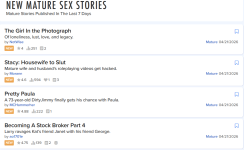
Until I see it somewhere on a page like this, I don't see it at all.
Similar threads


- Replies
- 23
- Views
- 974

Share: