Question: Creating a series as I publish part 2

StanParis

Virgin
Joined
Jan 17, 2024
Posts
3
Part 1 of a story I am writing has been up for a while, and I am about to submit the second part. I want them to be a series, but I am unsure how to do it: Should I submit the story first, have it approved, and then combine them. in a series, or should I create a series now, and submit party 2 that way? I hope this question makes sense. I did read the FAQ.
 
Simplest thing is just keep the same title and add 'ch '02' (if it's likely to be in the double digit chapters. If not 'ch 2' is fine.)

So title this next installment: In the Back Seat with Aunt Nia Ch 02.

There are ways to handle series manually, but this is the default means, and easiest.
 
Thanks! I can't squeeze in "Ch 2" because of the character limitation (it's a long title, I guess), but I can add II or 2. Will that work?
 
I had 01/02/03 work just fine, so I'd expect lone 1/2/3 to work as well.
 
In my experience as a reader, the automatic series are unreliable. I've seen a lot of stories that follow a pattern that should generate a series, but don't. I've also seen a lot that get broken by mistakes, such as using Ch. and Ch on different chapters. If you want to use an automatic series, you have to pay more attention to checking your titles before submitting.

Of course, once an automatic series is created, you can change it to manual if you need to fix it. In fact, you have to if you want to mark it complete.
 
Part 1 of a story I am writing has been up for a while, and I am about to submit the second part. I want them to be a series, but I am unsure how to do it: Should I submit the story first, have it approved, and then combine them. in a series, or should I create a series now, and submit party 2 that way? I hope this question makes sense. I did read the FAQ.
There's no good answer here, as the site could screw up no matter what you do or how closely you follow the FAQ.

- Keeping the title the same and adding numbers for the different chapters is about the only thing you can control.

- Sometimes the system will automatically create a series. Sometimes it won't. Sometimes it's within days. Sometimes it's within months.

- You can create a manual series, and it will be added at some point in the future, again within days or months.

- There's no guarantee your chapters will be linked together in the correct order regardless of manual or automatic creation, there is nothing you can do to fix it, and no amount of DMs, bug reporting, etc., will do anything to resolve the problem.

On the bright side, sometimes everything works perfectly, too.

Good luck!
 
Here is an article to assist you.

For a series to be created automatically by the system correctly, the titles must associate the different episodes seamlessly. If the title of your first episode makes this challenging, you can submit an edit that changes just the title. Once that edit goes through, your subsequent episodes can follow the same format.

Alternatively, you can publish episodes under any titling scheme you want and manually add them to your series after they get published.
 
- There's no guarantee your chapters will be linked together in the correct order regardless of manual or automatic creation, there is nothing you can do to fix it, and no amount of DMs, bug reporting, etc., will do anything to resolve the problem.
Can you give an example of this?
 
- There's no guarantee your chapters will be linked together in the correct order regardless of manual or automatic creation, there is nothing you can do to fix it, and no amount of DMs, bug reporting, etc., will do anything to resolve the problem.
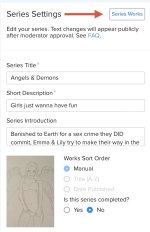
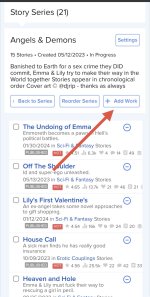
Actually, you can fix it by going to into the series configuration, making sure the sort order is set to manual, and clicking on Series Works. You might have to wait for your change to be approved if you switch from an automatic series to a manual one, but once everything is actually set to manual, there will be a button that says Reorder Series. That will open a screen where you can order the individual parts however you want. I'm not sure if that is immediate (pending cache refresh) or requires approval, but it does allow you to fix ordering issues.

There's also a + Add Work button next to Reorder Series if you need to add any missing chapters.
 
Can you give an example of this?
A common example is Ch 10 through Ch 19 appearing between Ch 1 and Ch 2. You have to plan ahead and pad your early chapters to the same number of digits as your last chapter, so Ch 01 or Ch 001, etc.

EDIT: That is for automatic series, or manual series sorted by title. Series ordered manually or by Date Published do not have this issue, although Date Published can cause problems if you have a chapter get held up and approved out of order.
 
Last edited:
Actually, you can fix it by going to into the series configuration, making sure the sort order is set to manual, and clicking on Series Works. You might have to wait for your change to be approved if you switch from an automatic series to a manual one, but once everything is actually set to manual, there will be a button that says Reorder Series. That will open a screen where you can order the individual parts however you want. I'm not sure if that is immediate (pending cache refresh) or requires approval, but it does allow you to fix ordering issues.

There's also a + Add Work button next to Reorder Series if you need to add any missing chapters.
I appreciate this advice. I have attempted this several times in the last six months. It didn't fix anything.
 
I appreciate this advice. I have attempted this several times in the last six months. It didn't fix anything.
An interesting thing I noticed is that the link to series info in the same section as the links to Next Part and Previous Part is:
https://www.literotica.com/series/se/494648859
while the page that actually loads is the same one linked in your main story list:
https://www.literotica.com/series/se/saturday-nights-in-the-dorm

The story order is displayed correctly on that page, so it kind of looks like there are two series (one automatic and one manual, maybe) in the database. When you click on the series link, it redirects, but when it's doing backend lookups to display next and previous, it's using the numerical series without redirecting to the named one.

Of course, I have no clue why the hidden series would be messed up.

Sadly, that doesn't help you fix it, even if I am right, but you might verify it for yourself and then include that information in another message to Manu. Maybe it will give him the insight needed to fix it?
 
Part 1 of a story I am writing has been up for a while, and I am about to submit the second part. I want them to be a series, but I am unsure how to do it: Should I submit the story first, have it approved, and then combine them. in a series, or should I create a series now, and submit party 2 that way? I hope this question makes sense. I did read the FAQ.
Is the title of part two going to be the same with a chapter marker at the end? If so your title is kinda long, which might make your use of Ch. 01 etc. complicated.

Your other option is to create a manual series. This is what I always do. So you go here:

IMG_3613.jpeg

Then you select this option (there is only one item in the sub-menu):

IMG_3615.jpeg

Fill it in, then go back to the previous menu and click the gear icon on your new series.

IMG_3616.jpeg

Then on this page (which is also what the series page looks like post saving), click series works.

IMG_3617.jpeg

Here you can then add stories:

IMG_3619.jpeg

When you save a version of your Chapter 2 a button appears which allows you to add it to a series before submitting. Things covered here:

https://forum.literotica.com/threads/story-still-pending-after-a-month.1652676/post-102648054

Or you can use the above dialog again later.

A couple of things:

Always remember to publish your series not just save it. There are different buttons.

It takes longer to get a manual series approved than a story, so ideal define the series ahead of time. Once all approved, there can be delays before the series page and your stories get updated. Normally within a day or so.
 

Attachments

  • IMG_3614.jpeg
    IMG_3614.jpeg
    233.9 KB · Views: 0
Last edited:
Sure. Beginning with the third chapter in this series (https://www.literotica.com/s/saturday-nights-in-the-dorm-ch-03?page=2) the "Read More" will direct people to skip the next chapter (so the end of 3 connects to 5, 4 connects to 6, etc.). Then you get to the end of 11 and it sends you to 4 instead of 12.
Okay, I think you are talking about something different. You are referring to the occasional bug with the proper alignment of "Read More" episodes and not the creation or management of a series using the series manager.
 
A common example is Ch 10 through Ch 19 appearing between Ch 1 and Ch 2. You have to plan ahead and pad your early chapters to the same number of digits as your last chapter, so Ch 01 or Ch 001, etc.

EDIT: That is for automatic series, or manual series sorted by title. Series ordered manually or by Date Published do not have this issue, although Date Published can cause problems if you have a chapter get held up and approved out of order.
I cover proper series titling in my How-To article on series
 
Cool - so it seems like making a manual series is the way to go for a number of reasons - to make sure it works the way you want; if your part 1 title doesn't include "Ch 01" (which I did, though I know you could edit it); or if you prefer for aesthetic reasons to spell out "Chapter Two" or use different wording, like "Part Two"...

That's probably what I'll plan to do.
 
Simplest thing is just keep the same title and add 'ch '02' (if it's likely to be in the double digit chapters. If not 'ch 2' is fine.)

So title this next installment: In the Back Seat with Aunt Nia Ch 02.

There are ways to handle series manually, but this is the default means, and easiest.
Does that work if the first bit isn't already titled "Ch 01?"
 
An interesting thing I noticed is that the link to series info in the same section as the links to Next Part and Previous Part is:
https://www.literotica.com/series/se/494648859
while the page that actually loads is the same one linked in your main story list:
https://www.literotica.com/series/se/saturday-nights-in-the-dorm

The story order is displayed correctly on that page, so it kind of looks like there are two series (one automatic and one manual, maybe) in the database. When you click on the series link, it redirects, but when it's doing backend lookups to display next and previous, it's using the numerical series without redirecting to the named one.
These are two links to the same series. Since it’s marked as completed, it necessarily has to be a manual one.

I suspect that the reason why story side box with the series info uses a numerical ID link is purely technical. My guess is that the procedure to creature the pretty link takes series ID and performs an extra query to fetch the series again, so to avoid that Manu coded the link-building in place, using the series ID (which is part of the story data).
 
An interesting thing I noticed is that the link to series info in the same section as the links to Next Part and Previous Part is:
https://www.literotica.com/series/se/494648859
while the page that actually loads is the same one linked in your main story list:
https://www.literotica.com/series/se/saturday-nights-in-the-dorm

The story order is displayed correctly on that page, so it kind of looks like there are two series (one automatic and one manual, maybe) in the database. When you click on the series link, it redirects, but when it's doing backend lookups to display next and previous, it's using the numerical series without redirecting to the named one.

Of course, I have no clue why the hidden series would be messed up.

Sadly, that doesn't help you fix it, even if I am right, but you might verify it for yourself and then include that information in another message to Manu. Maybe it will give him the insight needed to fix it?
I sincerely appreciate you taking the time and putting some thought into this.

Your "two series" theory could mean something. I let this series begin automatically, and then changed it to manual when the chapter problem started, thinking perhaps I could make some manual edits to fix it. Maybe there is a hidden duplicate lurking somewhere.

There's nothing I can see to indicate the existence of two separate series. In my Control Panel, under Story Series, it's only there once. All of the chapters appear in the proper order there, too.

To add to the weirdness, in one of my attempts to fix this it was suggested I redo the chapter list out of order, publish it, and then after it publishes revert to the correct order. I did that. I messed up all of the order (begin with Chapter 8, then go to Chapter 5, then to Chapter 1, etc.), and it took. The whole series order was a mess, and the "Read More" went along with the mess (after Chapter 8 it linked to Chapter 5, etc.).

Then I put it back to what it should be (1, 2, 3, 4, etc.), and the "Read More" went right back to skipping chapters. Just totally bizarre.

Anyway, I'll take your advice and add it to another note for Manu. Thank you.
 
These are two links to the same series. Since it’s marked as completed, it necessarily has to be a manual one.

I suspect that the reason why story side box with the series info uses a numerical ID link is purely technical. My guess is that the procedure to creature the pretty link takes series ID and performs an extra query to fetch the series again, so to avoid that Manu coded the link-building in place, using the series ID (which is part of the story data).

There's nothing I can see to indicate the existence of two separate series. In my Control Panel, under Story Series, it's only there once. All of the chapters appear in the proper order there, too.

Part of the reason I suspect two different series is because of situations like these:

https://www.literotica.com/series/se/494139660
https://www.literotica.com/series/se/forbidden-cultivation

Despite the technical fact that the stories in them should not be able to be in both stories, there is only one chapter that is in just one of them. The other 148 are in both and both appear on their story list. The Spanish (?) version also has two instances of the same series:

https://www.literotica.com/series/se/494150556
https://www.literotica.com/series/se/cultivacion-prohibida

Both of those also show up on their story list.

https://www.literotica.com/authors/lordescritor/works/stories?listType=combined

From that, it appears to me that automatic and manual series can exist at the same time, and the code to link them/hide one is flaky.
 
Part of the reason I suspect two different series is because of situations like these:

https://www.literotica.com/series/se/494139660
https://www.literotica.com/series/se/forbidden-cultivation

Despite the technical fact that the stories in them should not be able to be in both stories, there is only one chapter that is in just one of them. The other 148 are in both and both appear on their story list. The Spanish (?) version also has two instances of the same series:

https://www.literotica.com/series/se/494150556
https://www.literotica.com/series/se/cultivacion-prohibida

Both of those also show up on their story list.

https://www.literotica.com/authors/lordescritor/works/stories?listType=combined

From that, it appears to me that automatic and manual series can exist at the same time, and the code to link them/hide one is flaky.
I haven't checked the Spanish one, but the English series you've linked are legitimately two distinct series (the named one has ID 494134662; don't ask me how I figured that out).

I suspect the author had simply misunderstood how the whole series feature works and created a second, manual series to fill in the description/cover/etc. instead of taking over the automatic one. Perhaps this had been possible through some UI bug in the early stages of the feature, as it doesn't seem to be possible now. Or maybe something went wrong when turning from automatic to manual series and so now there are two, through some bug that is now fixed. (The two duplicate series were last modified about two years ago).

Either way, this is a distinct situation compared to one where there is (correctly) just one series on the author's story list.
 
I haven't checked the Spanish one, but the English series you've linked are legitimately two distinct series (the named one has ID 494134662; don't ask me how I figured that out).

I suspect the author had simply misunderstood how the whole series feature works and created a second, manual series to fill in the description/cover/etc. instead of taking over the automatic one. Perhaps this had been possible through some UI bug in the early stages of the feature, as it doesn't seem to be possible now. Or maybe something went wrong when turning from automatic to manual series and so now there are two, through some bug that is now fixed. (The two duplicate series were last modified about two years ago).

Either way, this is a distinct situation compared to one where there is (correctly) just one series on the author's story list.

I can easily be convinced it's a different issue. I was just explaining my thought process.

Still, I think they would both have to be automatic series then, as the latest chapter was added this month (4/18) and the series interface doesn't allow you to add a story to multiple series. But, apparently, that is a different bug.
 
Back
Top